Claude Code and The Rise of CLI

 TBA
TBAHow AI Brought the Command Line Back—and Why It’s Just the Beginning
On February 24, 2025, Anthropic released Claude Code as a research preview. By July, 115,000 developers were using it, processing 195 million lines of code in a single week. By November—six months after its public launch—it had crossed $1 billion in annualized revenue. ChatGPT needed eleven months to reach a comparable milestone. Slack needed four years.
Fifty-one days after Claude Code shipped, OpenAI released Codex CLI. Google, GitHub, and a wave of startups followed. An entire category crystallized almost overnight: the terminal-based AI coding agent.
Which raises an obvious question.
We already have IDEs. We have Visual Studio Code, JetBrains, Xcode—environments that have been refined for decades, with syntax highlighting, debuggers, refactoring tools, integrated testing, version control panels, and plugin ecosystems numbering in the thousands. These tools were specifically designed to make programming more productive. So why, in 2025, did developers abandon their polished graphical editors to type instructions into a terminal and watch an AI respond in plain text?
Why, of all the interfaces available, did the command line win?
This essay is an attempt to answer that question—and the answer turns out to be less about AI than about Unix, and less about the present than about a design philosophy that is now fifty years old.
A Brief History of the CLI
To understand why the terminal won, you have to go back to where it came from—and why it almost lost.
In the 1970s, the command line interface was the interface. Unix systems were built around text terminals. You typed; the system responded. The shell—sh, later bash, ksh, zsh—was not a convenience layer. It was the operating system’s public surface.
The philosophy that emerged was radical in its simplicity: small programs that do one thing well, connected by pipes. grep searches. sed edits streams. awk transforms structured text. The shell orchestrates them. Everything is a file. Everything that passes between programs is a text stream. Composability is unlimited because the contract between programs is simple: text in, text out.
But using it required the commitment of a scholar.
Millions of people first met computers through MS-DOS, OS/2, or a flavor of Unix in the 1980s and early 1990s. The experience was unforgiving by design. To list your files, you typed dir on DOS or ls on Unix—two different commands for the same action, depending on which system you were on. To search for text inside files, you reached for grep—a name that means nothing until you learn it stands for Global Regular Expression Print, a description that assumes you already know what a regular expression is. awk, the text-processing workhorse, was named not after what it did but after its creators: Aho, Weinberger, and Kernighan—their initials. sed stood for Stream EDitor. The names were inside jokes from the people who built the tools, not labels designed to help newcomers find their way.
The flags were worse. ls listed your files. ls -l added details. ls -la revealed hidden files. ls -lah made sizes human-readable. Each flag was a single cryptic letter with no visual hint it existed. The documentation—Unix man pages—was comprehensive but written for people who already understood the concepts. Looking up how to use grep required knowing enough about grep to parse the explanation.
And the system demanded perfect execution. One transposed letter—grpe instead of grep—returned command not found, and nothing more. A missing space, a wrong slash, a misplaced quote mark: the command either failed silently or succeeded catastrophically. Unix convention was to print nothing when a command worked; errors appeared on stderr, often tersely. DOS offered Bad command or file name, which confirmed something was wrong but not what or why. On either system, there was no undo. rm -rf deleted an entire directory tree without asking. format c: erased your hard drive. The CLI trusted you completely and protected you not at all.
Then came the graphical revolution—and for most people, it felt like rescue.
Apple’s Macintosh launched in 1984 with the slogan “the computer for the rest of us.” It meant what it said. Files lived in folders you could see. You moved them by dragging. You deleted them by dropping them on a trash can. Discovery happened by exploration: menus revealed what was possible; buttons looked like they could be pressed. You could not accidentally type the wrong command because there were no commands to type. Windows 95 brought the same logic to the mass market, and personal computing changed almost overnight.
By the mid-1990s, GUIs dominated. For most users, the terminal became a niche tool—the domain of system administrators and programmers who had memorized the incantations. It acquired its reputation: steep learning curve, arcane syntax, hostile to beginners.
But beneath the surface, the command line never stopped running the world.
Servers ran Linux. DevOps pipelines ran Bash scripts. Docker containers spun up Unix environments by the millions. Cloud infrastructure depended on shells and system utilities. Even modern IDEs quietly invoked command-line tools behind polished interfaces. The CLI did not die. It became infrastructural—the hidden machinery beneath every layer of modern software, invisible to most users and indispensable to all of them.
A Couple Made for Each Other
To understand why AI agents gravitate toward the command line, consider what a language model fundamentally is: a system that takes text in and produces text out.
That alignment is not incidental. The entire domain of software development is already a text-stream problem. Source code is text. Compiler errors are text. Test results are text. Git diffs are text. Stack traces are text. Documentation is text. Every artifact an AI needs to reason about code already exists in the medium the AI natively processes. No translation required.
But there is a more specific reason why this matters for AI, and it is the one that makes the CLI particularly powerful for agents: determinism. Unix tools do not just produce text—they produce reliably structured text. pytest output follows a consistent format: test names, pass/fail markers, assertion errors with line numbers. git diff always uses unified diff notation. grep output is always line-based, one match per line. Exit codes are universal: 0 means success, non-zero means failure, and every shell command in history has honored this convention.
This reliability matters enormously. An AI agent does not need to parse pixels or navigate a graphical interface. It reads the same structured text a human developer would read, formatted the same way it was ten years ago and will be ten years from now. The conventions Unix established over five decades—stderr for errors, stdout for results, pipes for composition—turn out to be exactly the conventions an AI agent needs to observe the state of a codebase and act on it.
Contrast this with GUI-based workflows. A GUI produces visual output: windows, buttons, rendered state. An AI interacting with a GUI must use computer vision to interpret the screen, then simulate mouse clicks and keystrokes to act. The process is fragile, slow, and sensitive to layout changes. A CLI produces text the AI reads directly. The command line was always the more machine-friendly interface. We simply did not have machines sophisticated enough to use it until now.
The Magic Under the Hood
Suppose you type: “The auth tests are failing. Fix them.”
Here is what happens inside Claude Code, step by step.
Step 1. Discover the failure.
Claude runs pytest tests/test_auth.py --tb=short. The output arrives over stdout:
FAILED tests/test_auth.py::test_login_valid_credentials - AssertionError: assert 401 == 200
FAILED tests/test_auth.py::test_refresh_token - AssertionError: assert 401 == 200
2 failed in 0.61s
The model reads this. Two tests expect HTTP 200 but receive 401—Unauthorized. The problem is in authentication, not in the test logic.
Step 2. Find the relevant code.
Claude runs grep -rn "def authenticate\|def login" src/ to locate the handlers. It gets back file paths and line numbers. It calls read_file on the auth module.
Step 3. Understand the context.
Reading the source, Claude finds a JWT validation function. The token expiry check compares token.exp against datetime.utcnow(), but the test fixture creates tokens using datetime.now(). A timezone mismatch: now() returns local time, utcnow() returns UTC. On a machine offset from UTC, freshly minted tokens appear expired before they are even used.
Step 4. Fix the code.
Claude calls write_file to update the test fixture, standardizing on datetime.utcnow() throughout.
Step 5. Verify.
Claude runs pytest tests/test_auth.py --tb=short again:
2 passed in 0.58s
Step 6. Check for regressions.
Claude runs the full suite: pytest --tb=short -q. All pass. It reports back in plain English, including a one-line explanation of what was wrong.
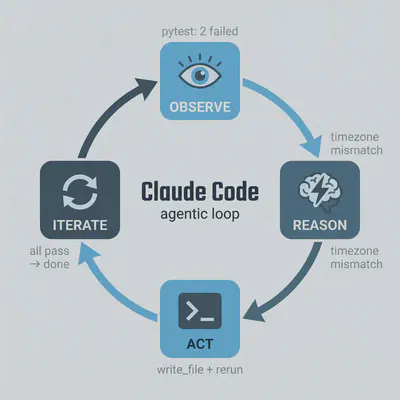
What is notable about this sequence is what it is not. It is not a neural network reasoning through the abstract semantics of JWT. It is a loop: observe, hypothesize, act, observe again. The intelligence is in the reasoning step. The execution—finding the file, reading it, running the test suite—is entirely Unix. grep found the function. pytest measured the behavior. The file system held the code. The AI did not replicate any of that infrastructure. It used it.
A New Architecture of Computing
Claude Code’s tool set is deliberately minimal—just five building blocks, each doing exactly one thing. In computer science these are called primitives: the irreducible atoms of a system, the simplest operations from which everything more complex is assembled. Claude Code has exactly five:
read_file— opens source files for inspectionwrite_file— creates or modifies themlist_directory— maps folder structuresearch_files— runs pattern searches across the codebase, equivalent togrep -rbash— executes any shell command:npm run build,pytest --tb=short,git status && git diff,docker compose up, or anything else installed in the user’s environment
Of the five, bash is the one that opens the entire Unix toolkit—and it runs as a continuous session rather than a series of isolated commands. State persists: the working directory set in one step is still set three steps later; a file written here can be read there. Claude does not simulate a shell. It runs one.
Anthropic could have built a proprietary execution environment from scratch. They did not. The decision to route all execution through Bash was a deliberate architectural bet: the existing substrate was already optimal. Fifty years of accumulated tooling, stability, and what engineers call composability—the ability to snap tools together like LEGO bricks, the output of one becoming the input of the next—all available for free.
That last quality, composability, extends upward to include the AI itself. In Unix, the pipe symbol (|) chains tools in sequence: grep | awk | sort means find the matching lines, reformat them, then alphabetize them—one continuous flow, no intermediate files, no switching between applications. The same logic now applies to AI agents. You can feed a live log stream directly into Claude: tail -f app.log | claude -p "Slack me if you see any anomalies". Or pipe a list of changed files into it for review: git diff main --name-only | claude -p "check these for security issues". The model becomes just another link in the chain—one that understands intent rather than flags. Text flows in; interpretation and action flow out.
This composability runs deeper than pipes. Claude Code is itself distributed as a standard Unix binary—an executable that reads from stdin, writes to stdout, accepts arguments, and returns exit codes like any other program. claude is not just a tool that uses the Unix ecosystem; it is a member of it. Any application capable of spawning a subprocess gets AI capabilities for free. The fastest demonstration of this came from Peter Steinberger, creator of OpenClaw—one of the fastest-growing open-source projects in GitHub history—describing his original one-hour prototype on the Lex Fridman podcast: “My search bar was literally just hooking up WhatsApp to Claude Code. One shot. The CLI message comes in. I call the CLI with -p. It does its magic, I get the string back and I send it back to WhatsApp.” A messaging application calling a CLI binary and treating intelligence like a Unix filter. OpenClaw has since built its entire architecture on this pattern—its imsg and other channel integrations all route through claude as a subprocess, each one a fresh expression of the same idea.
What this creates is a fractal version of the three-layer model. When a user sends a message to OpenClaw, the Intent layer is their natural language; the Policy layer is OpenClaw’s routing logic; the Mechanism layer is claude. But claude itself runs the same three layers internally: its own Intent (the user’s request), its own Policy (the AI reasoning), its own Mechanism (Unix tools executing beneath). The architecture nests inside itself, each level following the same protocol: text in, text out, composable by design. The Unix philosophy does not stop at the boundary of the AI. It propagates through it.
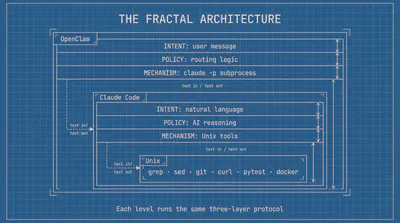
The resulting architecture has three layers:
Mechanism (Unix): composable primitives—grep, sed, git, curl, docker. Stable, deterministic, fifty years old.
Policy (AI): decides which tools to invoke, in what order, with what arguments. Interprets results. Iterates. This is where the intelligence lives.
Intent (human): expressed in natural language. No syntax to learn. No flags to memorize.
Unix always separated mechanism from policy. The system provided composable primitives; humans decided how to combine them. AI now automates the policy layer entirely.
That is why the command line won. The question was never really about interfaces—it was about compatibility. Unix was built as a machine-to-machine system: text in, text out, composable by design, deterministic by convention. Humans spent decades learning its idioms at considerable effort. AI agents needed no such effort. The CLI is not a step backward for them. It is their native environment—and it has been waiting fifty years for them to arrive.
One Bash to Rule Them All
Among all the shells that evolved from Unix — sh, ksh, zsh, fish — one became the universal standard. Bash, the Bourne Again Shell, was released in 1989 as a free, open-source replacement for the original sh written by Stephen Bourne. The name is a deliberate pun: “Bourne Again” acknowledges the shell it replaced while signaling a new beginning. Three and a half decades later, Bash is still the default shell on virtually every Linux server in the world, the language in which CI/CD (continuous integration and delivery) pipelines are written, cloud instances are bootstrapped, and Docker containers initialize. But it is not merely popular — it is universal in a way no other shell is.
This distinction matters enormously for AI agents. An agent operating across diverse environments — a developer’s laptop, a remote server, a Docker container in a CI pipeline — cannot assume which tools or shells are installed. It can assume one thing: /bin/bash exists. zsh is richer and more modern than Bash in many respects, and since 2019 it has been the default shell on macOS. But zsh is not present on a fresh Alpine Linux container, a minimal production server, or most cloud instances unless someone explicitly installed it. Bash is always there. For a tool that needs to work everywhere, Bash is the only reliable choice.
But availability alone does not explain why Bash is so well suited to AI agents. The deeper reason is structural: Bash was built to support the same observe → reason → act → observe loop that AI agents run. It just did not have an AI doing the reasoning.
Consider how an experienced developer uses the terminal. They run a command and read the output. They decide what to do next. They run another command and see what changed. This iterative cycle — test, interpret, adjust, repeat — is exactly the agentic loop, performed by a human. Bash accumulated fifty years of precise vocabulary for it.
Exit codes are the feedback signal. Every Unix command returns a number when it finishes: 0 means success; anything else means failure. pytest returns 1 if tests fail, 2 if it could not even collect them. curl returns 7 if the server was unreachable. git returns 128 if the repository does not exist. An AI agent reads these codes after every action — not by parsing prose, but by checking a single integer that the entire Unix ecosystem agreed on in the 1970s and has honored ever since.
Command chaining implements the conditional logic. && means “run the next command only if the last one succeeded.” || means “run this if it failed.” A sequence like npm install && npm run build && npm test is not merely three commands in a row — it is a conditional workflow that stops at the first failure and reports it. The agent reads the same exit codes and makes the same branching decisions a developer would, automatically.
set -o pipefail closes the last gap. By default, a Unix pipeline like cmd1 | cmd2 | cmd3 reports only the exit code of the final command — meaning if cmd1 or cmd2 fail silently, the pipeline still reports success. With pipefail enabled, any failure anywhere in the chain surfaces. For an agent that depends on accurate feedback to reason correctly in the next iteration, silent failures are catastrophic. pipefail makes the observation step reliable.
The persistent session ties it all together. Because Bash stays open across the entire conversation, state accumulates across loop iterations: the directory set in step one is still set in step five; the environment variable exported in step two is still available in step seven; the file written in step three can be read in step four. The agent does not rebuild its context from scratch with each action. It builds continuously, exactly as a developer would over the course of a working session.
It’s HER Again!
This architecture has already begun reshaping the landscape of developer tooling—and with it, the relevance of operating systems.
macOS has become the preferred platform for AI-assisted development, and the reason is structural. macOS is BSD Unix at its core—a branch of the same Unix family that runs every Linux server in the world, sharing the same command-line tools, filesystem conventions, and process model. The terminal runs natively, with the full Unix toolchain available without translation layers. Homebrew, a package manager for macOS, makes CLI utilities trivially installable. Apple Silicon delivers the efficiency that makes running local AI models practical. And the broader developer ecosystem—the tools AI agents actually invoke—was built for Unix first. When Claude Code runs npm, python, git, or docker on macOS, it runs native binaries in their natural environment. No compatibility shims, no path translation, no behavioral edge cases. The pattern is visible in the release history: Claude Code, Cursor, Ollama, and most of the wave of AI developer tools that followed all launched on macOS first, with Windows support added later. The structural reasons and the market behavior point in the same direction.
Windows has adapted rather than collapsed. WSL (Windows Subsystem for Linux) lets Windows host a genuine Linux environment, and PowerShell has adopted Unix-style pipelines. The gap is narrowing. But WSL still introduces a translation layer—filesystem permissions, path conventions, and network behavior differ subtly from native Unix. For agentic workflows that depend on environmental consistency, those subtle differences compound. The direction is convergence, not extinction. But the convergence is toward Unix, not away from it.
The deeper question is not which operating system survives. It is what the interface becomes.
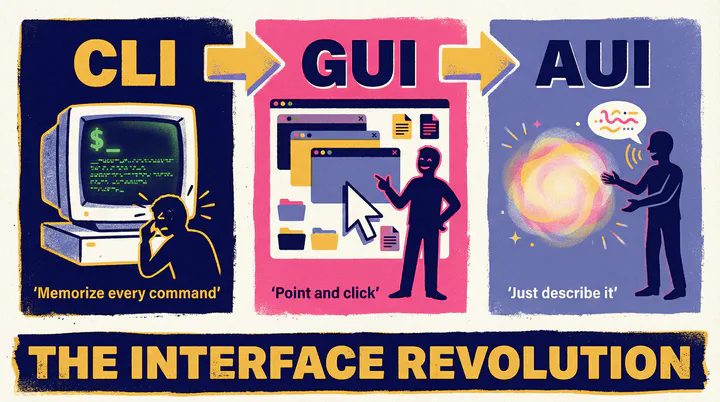
The graphical user interface was built for humans navigating systems by hand: point, click, drag, select. The command line interface was built for humans operating systems with precision: compose, pipe, redirect, script. Both assume a human at the keyboard, bridging the gap between intent and execution.
AI agents dissolve that gap.
What emerges is a new paradigm entirely—call it the AI User Interface, or AUI. Not windows and icons. Not commands and flags. A conversation. You describe what you want in plain language; the AI understands, decides, acts, and reports back. The interface disappears. Only intent and outcome remain.
This is not a modest improvement on what came before. It is the same category of shift that the GUI represented in 1984—a change not just in how you interact with a computer, but in who can interact with one at all. The GUI democratized computing by eliminating memorized syntax. The AUI goes further: it eliminates the need to think in computing terms at all. If the GUI was “the computer for the rest of us,” the AUI is the computer for everyone, including those who would never have described themselves as users.
The question is not whether the GUI will disappear—it almost certainly will not, for the same reason the CLI did not disappear when the GUI arrived. The command line went underground in 1984, not extinct: still running, still essential, visible only to those who sought it out. The GUI will follow the same arc.
Think of it as the transition to autonomous vehicles. When robotaxis become the reliable default, the steering wheel becomes optional for most trips. But people will still want to drive—not out of necessity, but by preference: for the pleasure of it, for the control it affords, for the tasks where human judgment navigating physical space remains genuinely superior to describing a destination in words. In some science fiction scenarios, this logic runs to its conclusion: in a fully autonomous world, you have to specifically request a car that has a steering wheel. Manual driving becomes an opt-in rather than a given. The GUI will occupy the same position. Figma, Photoshop, video editors, spatial design tools—tasks where a human eye moving elements across a canvas is superior to describing intent in words—will retain the GUI not as a fallback but as a deliberate choice. For most people, in most contexts, the AUI will simply be faster and more capable. What changes is the default: today, the GUI is what you encounter first. In an AUI world, the conversation is.
This coexistence is not hypothetical — it is already happening. Applications are already calling Claude Code as a subprocess, embedding AI capabilities inside fully visual interfaces without any terminal interaction from the user. The GUI calls the CLI; the CLI provides the intelligence. The three paradigms are not sequential stages; they are already simultaneous layers. The terminal is not waiting for the GUI to retire. It is running underneath it right now, the same way it always has.

The fully realized version of this vision already has a name in popular culture. In Spike Jonze’s 2013 film Her, the protagonist Theodore interacts with an AI operating system named Samantha—no keyboard, no screen, no commands. He speaks; she listens, remembers, reasons, and acts. She manages his schedule, drafts his letters, navigates his emotional life, and exists simultaneously across every device. The film framed this as a near-future intimacy. It is beginning to look more like a near-future interface standard.
We are not there yet. The bottleneck is not intelligence—it is cost. Real-time voice interaction at human quality demands substantial compute: speech recognition with near-zero latency, synthesis that captures natural rhythm and tone, contextual memory sustained across long conversations, response times fast enough not to break the flow of speech. These capabilities exist today in research previews and premium tiers. But running them continuously, for everyone, at the price point of a default interface, remains out of reach. The economics have not yet aligned.
Until they do, text is the bridge.
The terminal agent—typing intent, receiving results in plain language—is the most practical form of AUI available right now. It has AUI’s essential property: natural language replaces syntax. But it skips the overhead of voice. Claude Code is not the destination. It is the current best approximation of a paradigm that is still becoming. The CLI is prominent again not because it has won, but because, of all existing interfaces, it sits closest to what the AUI requires: a substrate that accepts language, executes reliably, and returns structured results.
The history of computing interfaces runs in one direction. CLI gave way to GUI; GUI is giving way to AUI. In each transition, the interface above changes while the foundation below persists. The terminal was invisible under the GUI for thirty years—still running, still executing, still the engine beneath every polished surface. It will be invisible again under the AUI. The room you had to enter to use the computer will simply cease to be a room you notice.
Until that day, the terminal is where the future is being built.
Sources
- Anthropic. [“Anthropic acquires Bun as Claude Code reaches $1B milestone."](https://www.anthropic.com/news/anthropic-acquires-bun-as-claude-code-reaches-usd1b-milestone) November 2025. — Launch date, $1B ARR figure, comparison with ChatGPT and Slack.
- “Claude Code reaches 115,000 developers, processes 195 million lines weekly.” ppc.land, July 2025. — Developer adoption statistics.
- Coldewey, Devin. “OpenAI debuts Codex CLI, an open-source coding tool for terminals.” TechCrunch, April 16, 2025. — Codex CLI launch date (51 days after Claude Code).
- Anthropic. “Claude Code overview.” Claude Code Docs. — Agentic loop, tool primitives, pipe examples.
- Anthropic. “Bash tool.” Claude API Docs. — Persistent Bash session mechanism, five primitives, git checkpointing pattern.